

Google is calling its latest Android expansion the biggest update the platform has ever received. That is an enormous claim for an operating system that has already gone through more than a decade of redesigns, privacy changes, multitasking upgrades and AI integration.
The reality is more complicated. Android 17 itself does not appear to be a dramatic visual reinvention. Instead, Google is combining several smaller platform improvements with a much larger layer of Gemini-powered intelligence, a redesigned Android Auto experience and a new class of premium ChromeOS-style laptops.
This PhonesGate editorial separates what looks genuinely useful from what appears overhyped, unfinished or dependent on AI promises that still need real-world testing.
Key takeaway
PhonesGate analyzes Android 17, Gemini Intelligence, Android Auto, AI-generated widgets, agentic actions and Google's new premium Chromebook category.

What Google actually announced
The announcement covers four broad areas:
- Android 17 platform improvements;
- Gemini Intelligence and agentic actions;
- a redesigned Android Auto experience;
- a new premium Chromebook category referred to as Google Books.
These updates are connected by one strategic idea: Google wants AI to become the operating layer across phones, cars and laptops rather than remain a separate app.
11 min read
Samsung coverage from PhonesGate. Published Jul 25, 2026.
Android 17 is evolutionary, not revolutionary
The new Android version does not appear to introduce a full visual redesign. Most of the visible changes are incremental, while the more ambitious features come from Gemini integration.
That does not make the update unimportant. Small improvements can have a larger daily impact than a dramatic redesign, especially when they save time or reduce repetitive tasks.
A redesigned Gemini interface
The Gemini interface shown during the presentation has a more polished, animated appearance. It uses blur, glow and a short transition before content sharpens into focus.
Google also labeled the interface as conceptual and subject to change. That is important because promotional UI often differs from the final version that ships to users.
The visual update is therefore interesting, but it should not be treated as a confirmed final design.
Autofill becomes more context-aware
One of the most practical Android 17 changes is a smarter autofill system.
Traditional autofill can already enter names, addresses, phone numbers and payment details. The new system is designed to retrieve structured information from services such as Gmail, Wallet and Photos.
In theory, this means Android could fill in information that is not stored in a standard contact card. A travel form could ask for a passport number, and the system could retrieve it from a saved document or image instead of forcing the user to switch apps.
Why this feature matters
- fewer app switches;
- faster form completion;
- less manual copying;
- better use of information already stored in Google services.
The privacy and security implementation will be critical. Sensitive documents such as passports must be handled with clear user consent and strong local protection.
Creator tools are becoming part of Android
Google is also adding more system-level creator tools.
These features are designed to support popular short-form video workflows, including:
- cutting a person out from the background;
- placing a talking head over other content;
- processing images directly inside the operating system;
- creating social-media-ready layouts without a separate editing app.
Building these tools into Android could reduce the gap between Android and iPhone creator workflows.

Smart Enhance may be technically better but visually worse
Google demonstrated a photo and video enhancement feature intended to reveal more detail in shadows and highlights.
The problem is that more visible detail does not automatically create a better image.
Excessive brightening can flatten contrast, remove depth and produce a lifeless result. A darker image with controlled highlights and shadows may look more natural than a brighter image that exposes every detail.
This is a recurring issue in smartphone photography. Computational processing can optimize for technical visibility while damaging the artistic character of the image.
PhonesGate take: smartphone cameras need restraint
The next stage of computational photography should not be about making every photo brighter.
Manufacturers need to preserve:
- natural shadow depth;
- realistic contrast;
- skin-tone accuracy;
- controlled highlights;
- scene atmosphere.
An enhancement tool should offer a choice rather than applying one aggressive style to every image.
Pause Point offers a different approach to digital wellbeing
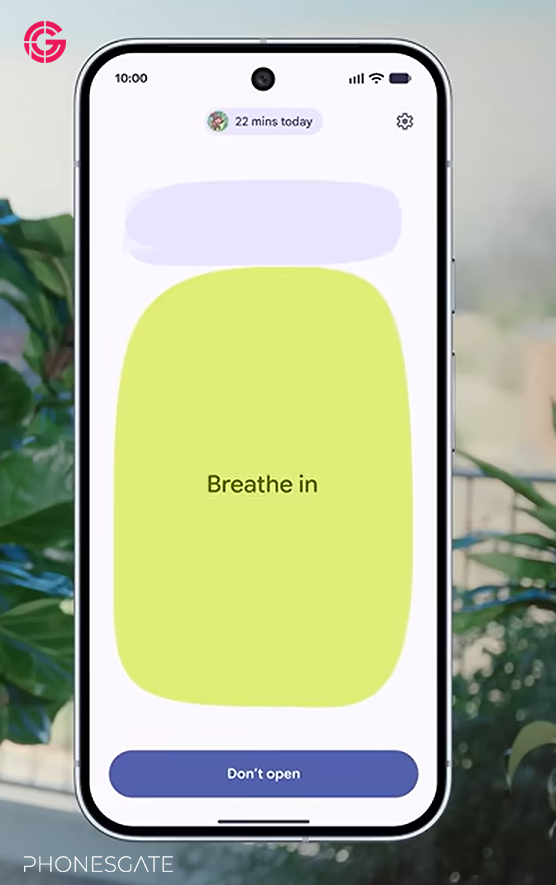
Android 17 introduces a digital wellbeing feature called Pause Point.
Instead of blocking an app after a time limit, Pause Point intervenes before the app opens. It briefly asks whether the user really wants to continue.
The system may show:
- time already spent in the app;
- a breathing prompt;
- alternative apps;
- custom photos intended to interrupt the habit loop.
This is a more behavioral approach than a hard time limit. It does not prevent access, but it introduces friction at the moment of impulse.
Will Pause Point actually work?
The feature is conceptually strong because many app-opening habits are automatic rather than intentional.
However, users can become accustomed to prompts and dismiss them without thinking. The long-term effectiveness will depend on whether the intervention remains varied and personally relevant.
Rambler improves speech-to-text
Google also introduced a speech-to-text feature called Rambler.
Its goal is not only to transcribe speech, but to clean it up by removing filler words and joining fragmented sentences into a coherent thought.
This could improve:
- voice notes;
- message dictation;
- meeting summaries;
- idea capture;
- accessibility workflows.
The challenge is preserving meaning. A system that cleans speech too aggressively could remove hesitation that carries emotional or contextual value.
Samsung Galaxy and Pixel will receive features first
Google indicated that several of these features will arrive first on Samsung Galaxy and Google Pixel devices.
This continues a pattern where Google uses Samsung's global Android reach while also supporting its own Pixel hardware.
For buyers, the important point is that new Android features may not reach every manufacturer at the same time.
Gemini Intelligence is the real centerpiece
The largest part of Google's announcement is not Android 17 itself. It is Gemini Intelligence.
Google describes this as a system that uses personal context from multiple Google services and can perform actions on the user's behalf.
That means Gemini could use information from:
- Gmail;
- Calendar;
- Photos;
- Wallet;
- Maps;
- travel services;
- other connected apps.
This is the transition from a chatbot to an agent.
Agentic AI is useful, but trust is still the problem
Google demonstrated a scenario where Gemini identifies a concert, confirms interest and offers to purchase tickets.
The concept is convenient. The execution raises obvious questions.
- Which date will it choose?
- Which venue?
- Which seats?
- What price limit?
- What happens if the listing is incorrect?
- Can the user review every step?
A one-click purchase button may look impressive in an advertisement, but users need a transparent approval flow.
PhonesGate take: AI should prepare, not blindly purchase
The best implementation would allow Gemini to:
- find the correct event;
- compare available dates and venues;
- filter seats by price and location;
- present the final options;
- wait for explicit confirmation.
This would still save time without asking the user to trust a black-box purchase.
Custom AI-generated widgets could be a major Android advantage
One of the most promising Gemini features is temporary custom widget creation.
A user could request a travel widget that combines:
- flight information;
- weather;
- hotel details;
- transportation information;
- calendar events.
After the trip, the widget could be removed.
This fits Android particularly well because Android already supports flexible home-screen customization.
Natural language can make advanced automation accessible
Android and Google Home already support advanced automation, but many users never configure it because the setup process is too complicated.
AI could allow a user to say:
“Turn on the living-room lights, lower the temperature and start music when I arrive home.”
The system could then build the automation automatically.
This is one of the clearest examples of AI solving a real usability problem rather than creating a novelty feature.
Android Auto receives a full visual overhaul
Android Auto is becoming more modern and information-rich.
The updated navigation interface includes:
- building silhouettes;
- overpasses;
- specific lane guidance;
- a revised app drawer;
- customizable widgets.
The new design appears intended to compete more directly with Apple's increasingly polished in-car interfaces.
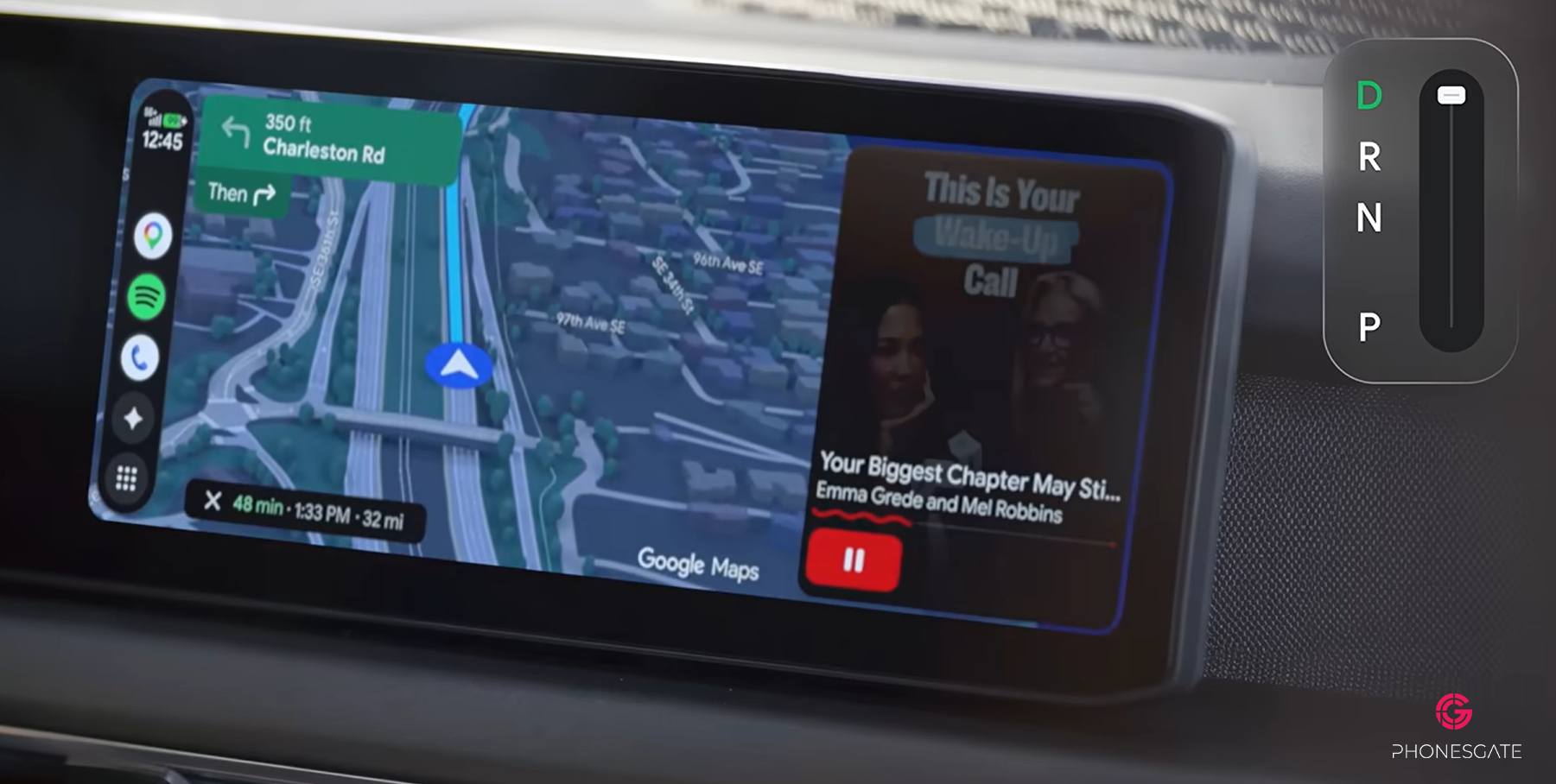
Customizable Android Auto widgets
Widgets on the right side of the interface can surface information such as weather, calendar events, media and travel details.
If Gemini can generate these widgets automatically, the in-car interface could adapt to the current trip instead of showing the same static layout every day.
YouTube playback while parked
Google also demonstrated full-screen YouTube playback in the vehicle while parked.
This makes sense for electric vehicles, where users may wait 30 to 40 minutes during charging.
When the car begins moving, the video is expected to disappear and continue as background audio.
Important unanswered questions
- How does Android Auto detect that the vehicle is moving?
- Does the system depend on vehicle data or GPS?
- Is YouTube Premium required for background playback?
- Will the transition work consistently across car manufacturers?
Cross-platform AirDrop support expands
Google is also expanding Android-to-Apple file sharing support across more devices.
Better compatibility between Android phones, iPhones and Macs would remove one of the most frustrating ecosystem barriers.
For users working across Android and macOS, direct photo and file transfer could be a major quality-of-life improvement.
Google Books: a new premium Chromebook category
The final announcement introduces a new category called Google Books.
Despite the name, these are not e-readers. They appear to be a premium generation of Chromebooks with deeper Gemini integration.
The devices retain familiar ChromeOS elements:
- browser tabs;
- Android app support;
- cloud-based workflows;
- Gemini features;
- custom widgets.
The AI cursor is the most interesting laptop feature
Google's most distinctive laptop idea is an AI-enabled cursor.
By moving or activating the cursor, the user can turn it into a multimodal Gemini tool.
The cursor can be used to:
- identify an image;
- ask questions about text;
- draft a reply;
- combine multiple images;
- launch contextual AI actions.
This is strategically smart because the cursor is one of the most familiar elements in desktop computing.
Why the cursor approach may work
AI features often fail because users do not know where to find them. Integrating AI into the cursor makes it available everywhere without requiring a separate app.
The value will depend on speed, accuracy and whether the system remains unobtrusive when not needed.
Multiple manufacturers will build Google Books
Google indicated that manufacturers such as HP, Dell, Lenovo, Acer and ASUS will participate.
The devices will be identified by premium construction and a glowing bar on the rear.
Google did not clearly explain what the light bar will do. Potential uses could include:
- battery status;
- charging completion;
- notification alerts;
- Gemini activity;
- device status.
Pricing will determine whether Google Books succeed
Premium Chromebooks have struggled when their prices approach traditional Windows laptops and MacBooks.
If Google Books cost significantly more than $1,000, buyers will compare them directly with devices that offer stronger desktop software compatibility.
Google must prove that Gemini integration provides enough value to justify the premium.
What looks genuinely useful
- context-aware autofill;
- better speech cleanup;
- natural-language automation;
- temporary AI-generated widgets;
- the redesigned Android Auto interface;
- cross-platform file sharing;
- the AI-enabled cursor.
What looks overhyped
- one-click AI purchases without visible approval steps;
- aggressive photo enhancement presented as universally better;
- rebranding existing product categories without clear hardware differentiation;
- concept interfaces shown before final implementation.
Frequently asked questions
Is Android 17 the biggest Android update ever?
Android 17 alone does not appear to be the biggest update ever. The broader ecosystem update is significant because it combines Android, Gemini, Android Auto and laptops.
What is Gemini Intelligence?
It is Google's system for using personal context across services and performing actions on the user's behalf.
What is Pause Point?
Pause Point is a digital wellbeing feature that interrupts automatic app opening and asks the user to reconsider.
What is Rambler?
Rambler is an improved speech-to-text feature designed to remove filler words and create more coherent text.
What is new in Android Auto?
Android Auto receives a more modern navigation interface, better lane guidance, customizable widgets and parked video playback.
What are Google Books?
Google Books appear to be a premium Chromebook category with Gemini integration and an AI-enabled cursor.
PhonesGate verdict
Google's claim that this is the biggest Android update ever is exaggerated if Android 17 is considered by itself.
The platform update is incremental. The larger story is that Google is turning Gemini into a system-wide layer across phones, cars and laptops.
The most convincing features are not the most dramatic. Smarter autofill, better speech cleanup, temporary widgets and natural-language automation could save users time every day.
The least convincing features are the ones that ask users to trust AI with money, purchases and irreversible actions before the full approval process is visible.
PhonesGate's conclusion is that this may not be the biggest Android update ever, but it could become one of the most important—if Google delivers the promised features reliably, transparently and with strong user control.