


Source and context
What Pause Point does
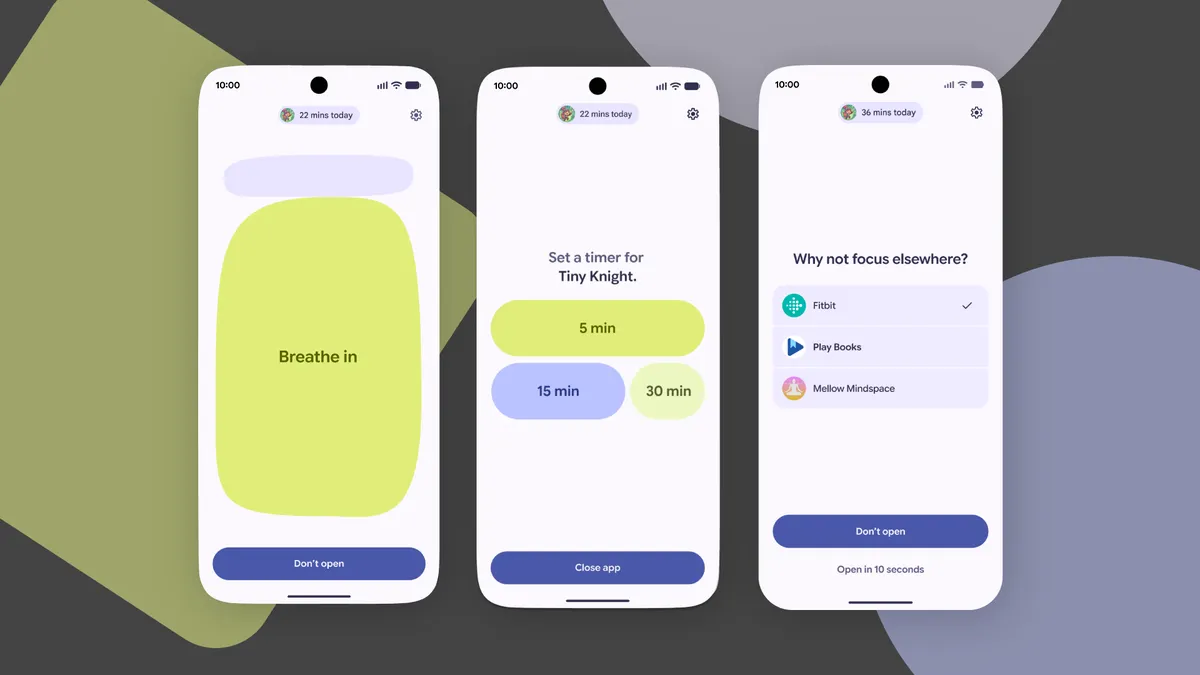
The publication describes Pause Point as a new Android feature designed to interrupt autopilot app use. When you open a distracting app, the system presents a 10‑second pause that asks, “Why am I here?” During that pause users can do a short breathing exercise or set a timer to limit session length. The pause screen can also surface favorite photos or offer alternative app suggestions such as an audiobook.
Controls and persistence
Pause Point includes a friction measure to keep it from being turned off casually: disabling the feature requires restarting the phone. The approach is intended to sit between flexible app timers and total lockouts — giving users a gentle nudge rather than an immediate blockade or an easily bypassed limit.
Key takeaway
Google is introducing Pause Point, a new Android feature that inserts a brief 10‑second pause when you open potentially distracting apps.
Why it matters
Built‑in wellbeing tools that change how people interact with their devices can affect daily screen time and habits without forcing strict limits. Pause Point’s brief interruption encourages reflection and offers alternatives that help people replace mindless scrolling with a chosen activity. Because it’s implemented at the platform level, it can reach a large portion of Android users without needing a separate app.
PhonesGATE quick analysis
Pause Point leans toward behavioral nudges rather than hard restrictions, which should make it attractive to users who find timers too easy to dismiss and lockouts too rigid. The 10‑second window is long enough to prompt reconsideration but short enough to avoid excessive friction for legitimate app use. The ability to surface photos and alternative actions is a practical touch — it gives users immediate, appealing options rather than simply removing access.
2 min read
Google coverage from PhonesGATE. Published Jul 18, 2026.
What this means for buyers
If you’re looking to cut down on distracted phone use without imposing strict limits, Pause Point may be a helpful built‑in option once it becomes available on your device. It’s worth trying if you commonly lose track of time in social or entertainment apps but don’t want full lockouts. Because disabling the feature requires a reboot, users should be comfortable with that extra step before enabling it.
Related device context
Pause Point is a platform feature for Android, so its availability and behaviour may vary across manufacturers and Android versions. Users interested in Android wellbeing tools might also compare Pause Point with existing app timers and digital wellbeing settings on their phones.
Sources and methodology
This article is based on reporting from Google Android, with PhonesGATE editorial context and buyer-focused analysis.